 In my last post on Campaign Tagging, I walked you through the basics of setting up tagged links that work in conjunction with Google Analytics and Email Marketing. While campaign tagging is not a new feature within Google Analytics, it’s still a powerful tool to keep in your Inbound Marketing tool belt.
So let’s jump right into it! You’ve created a newsletter; used the URL Builder to generate your tagged links and have successfully delivered your newsletter. In order to see the results of your newsletters performance, you’ll need to log into Google Analytics: view Reports → Traffic Sources and then Campaigns. Once you’re in the Campaign dashboard, look for the specific campaign that you referenced when you were generating the links, i.e. Dec-2009-Week-Two
Once you click on your campaign name, you’ll have the ability to review different reports like landing pages, regions, new vs. returning visitors and more. We’ll be focusing on Ad Content today.
Ad Content or Campaign Content is one of the optional values that you can set when generating your tagged links (fig. 1).You will use this option to differentiate between ads within your newsletter. In other words, if you have three separate links that have the same landing page, this is where you would distinguish which link sent the most visitors to your site.
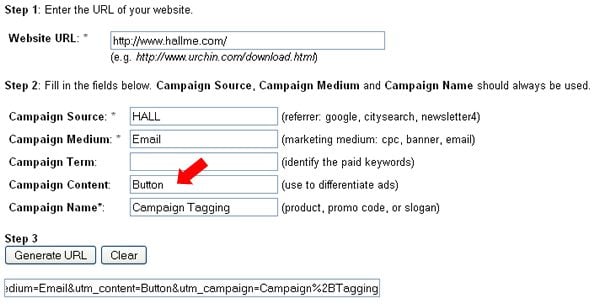
I used the example “Button” above to show that this link will be associated with a graphical button that will be used in a newsletter. If there was a text link as well, you would then change Campaign Content to “Link” and regenerate the URL. See example below.
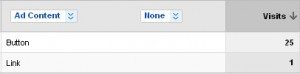
The benefit of using Ad / Campaign Content is that when reviewing analytics, you’ll be able to view this report and see whether or not your graphical button had more impact than the textual link. With this data, you can gauge what kind of user conversion works best with your target audience. As you can see in the example above, the graphical button had far more success than the textual link for this particular campaign.
Although reporting and link performance is available in most Email Service Provider platforms, connecting your campaigns with Google Analytics gives you far more power. You can track and analyze your visitors behaviors AFTER arriving to your site via your email campaign and not just what link they click on within their Inbox.



 Subscribe via RSS