Merge Your Google+ Profile and Your YouTube Channel

by

Google+ and YouTube recently announced that you can merge your business YouTube channel and your Google+ page.

Once the pages are merged:

  • Your YouTube videos will be viewable right from your Google+ page, on a separate YouTube tab
  • You will have access to hosting live ‘On Air’ hangouts
  • You can upload videos from YouTube and autoshare them on Google+ to specific circles
  • Multiple people can now manage your YouTube channel, without having to share a password.

The merge is currently in Beta but we decided to give it a try.

Below is a video showing you how easy it is to merge your YouTube channel and your Google+ page. With Google owning so many tools we all use for business, it is not far off to expect them all to be linked at some time.


If you can’t see the video, please watch it over on YouTube here.

Instructions on how to merge your channel and your G+ page

First to set you up for success, you need to make sure the Google account that your YouTube account is assigned to is already a page manager of your Google+ page. If it isn’t, you can set that in the Managers section of your Settings.

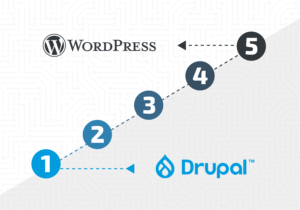
After that, just follow these 5 simple steps and you will have merged your two profiles:

  1. Make sure you are logged into your Google Plus page and your YouTube channel
  2. In the upper-right hand corner, go to Settings
  3. Under your Account Information, click on Advanced
  4. Choose to Connect with a Google+ page (beta)
  5. Confirm your request

After that has been done, you can go to your Google+ page and see the new YouTube tab added to your profile.

If you want more information on merging your Google+ page and your YouTube channel, they actually set up a Google+ community on the topic for feedback and issues. Since this feature is still in beta, I am sure feedback is being taken into account as they decide what to do next.

The Gamble of Doubling Down on Social Media

by

  Black Jack Hand
   

This article from Business Insider talks about how Proctor & Gamble is struggling to meet its marketing goals after the CEO made an announcement that they were going ‘all-in’ on social media.

In a recent interview, P&G’s CEO is now saying they are instead going to increase their paid search budget and focus on traditional marketing efforts like sampling. While P&G is working with the biggest ad budget on the planet, what they learned can shed some light for the rest of us.

Facebook Changed the Rules

One thing that made the gamble on social media not work the way P&G planned was that Facebook changed the rules of the game. Facebook changed its algorithm for what people see in their news feed. Business pages went down in impressions significantly.

Is it unfair for Facebook to ‘change the rules’? Not really. Facebook is a free service. It isn’t like you paid for the features they promised you. That free service comes to you thanks to ads delivered to you by your ‘likes’ and activities. As Facebook matures, its job is to show users the content and ads they respond to best. That left many a brand page on the cutting room floor.

What can you do?

So what is a business supposed to do? If Facebook is your marketing channel of choice, you need to make darn sure you are delivering really, really good content that people like and respond to. The more people like and respond to your content, the more you will show up in people’s news feeds.

Second, you need to focus your marketing efforts on your own territory! Those rules won’t change at the drop of a hat.

Your owned marketing territory is your website, your blog, your email list and/or your contact list. Social media sites are great, they are popular, they are where people are, but they are also owned by stakeholders that are worried about their social media sites making money, not how you use them to market your business.

Social media is a great way to let people know about your company, build trust, create conversations and engage current and future customers. What we as businesses need to do is use those opportunities to get people to do something else with your business like participate on your owned marketing channels.

photo credit: Images_of_Money via photopin cc

A Morning with Google: The Scoop

by

Scoop of Ice CreamIt’s not often that you get to see a real Google big wig in the flesh – much less, here in Portland, Maine. Earlier this month we had the pleasure of meeting and gaining a few pearls of wisdom (and hints of what’s to come) from Steve Arthur, Google’s Head of Industry: Retail at the Ad Club of Maine’s Google This! event. He had some interesting things to say so I thought I’d recap the main takeaways and a few things that may be on the horizon.

It’s Not Just About the Hard Sell

Gone are the days of the hard sell. People research everything now. And the evolution of online search, shopping apps and other technology has empowered consumers in a way that makes standing out from the crowd essential. Drawing people in and grabbing them with stories and experiences is becoming more and more important than ever. Arthur cited Fab.com, ModCloth.com and others as sites that are doing this well.

What Happens on the Internet Influences In-store Decisions

It’s no secret at all that consumers have become increasingly connected thanks to mobile devices and the roles they play in people’s daily lives. This means that we as marketers have the opportunity to reach our customers in more ways than ever before, throughout their daily routine, making the internet even more influential to offline sales, not just online sales. It’s important that retailers (and business owners alike) think of their site as a path to purchase, not just an online storefront.

Thinking beyond the basic conversion and looking at the bigger picture is essential. We need to remember to consider multiple customer interaction points as conversions and assign these conversions with different values. It’s not as simple as “they came, they browsed, they purchased” anymore. Arthur cited King Arthur Flour as a brand that is doing this well by integrating multiple onsite interaction points: video views, chatter, recipe page views, bakers hotline requests…the list goes on and on.

Attribution and Mobile Don’t Always Mix

Increased mobile adoption is great, but we could do without the attribution challenges it brings. Think about it: If you access a website from your work computer, mobile phone, tablet and your home desktop computer, you’ve got four sets of cookies floating around for one person. Arthur mentioned that they are hoping that Chrome log-ins can help them to create models that will eventually enable them to better understand user behavior and return on investment. It will be interesting to see how Google attempts to improve upon this.

Oh Yeah, And Self Driving Cars? Sooner Than You Think.

Less internet marketing-related, but a fun tidbit. Self-driving car technology could be here sooner than we imagine. Wonder how they’ll integrate that into their advertising platform… 

Photo credit: TheCulinaryGeek

Thinking About Evolving Search Behavior

by

birds-thinkingI had an interesting conversation with a friend recently about kids in school in these modern times. We were reminiscing on how we had to collect information for school reports – libraries, old magazines, microfiche, interviews with experts and encyclopedias.

Neither of us have high school aged children, but now it seems kids just need to Google it and maybe purchase a reference on Amazon. Information surrounds us wherever we go.

We. Google. Everything.

We Google things we want to know more about. We Google people, news, questions, health facts, directions, businesses, videos, things to make us laugh, ex-boyfriends, the weather, answers to math questions, recipes and so much more.

The way we search is constantly evolving. In this Search Engine Journal article, the author speaks to Duane Forrester’s (Sr. Product Manager at Bing) breakdown of the new ‘search session’. We no longer type in a ‘one-and-done’ search. Instead, we make a series of searches, open multiple tabs and we rework our search terms until we feel we have found the perfect keywords to show us the best results.

Search is about the whole picture, now more than ever

So if that is how you and I search, why are we still optimizing for the one-and-done search? Each of those modified searches is part of the new search experience. The one-and-done search is now more about the entire experience. Meta descriptions, author markups, social media presence, page load time, multiple pieces of content marketing, user experience and design are a bigger factors than ever in the ‘search process’.

So what can you do to be prepared for new search behaviors?

  • Take stock of the whole picture your company is showing the world.
  • If there is a term you NEED to be found for, be found by multiple sources (your website, news, guest blogs, social media).
  • Be aware of the search landscape, how people find your site and of what makes them buy from you. You can find a lot of information in your site’s analytics to help you get a clearer picture of how people find you and move through the funnel. You also can learn a lot from your customers and your sales team about what value customers saw in your company that made them choose you over your competition.
  • Be clever. This title tag change from Infinum was brought to my attention from our designer. See below (or on their site) how the title tag changes when you click to a different tab in your browser. Clever.
    title-change

Search engines have changed – they have become more personal and show varied results. Searchers behaviors have changed, we no longer do the one-and-done search. What we use search engines for has changed. We need to adapt to these changes or we may be left in the dust. It may be time to rethink your company’s search experience and think less about keywords and rankings.

photo credit: dicktay2000 via photopin cc