Choosing the Right CMS

Read our CMS Blog Topics CMS Comparison Chart

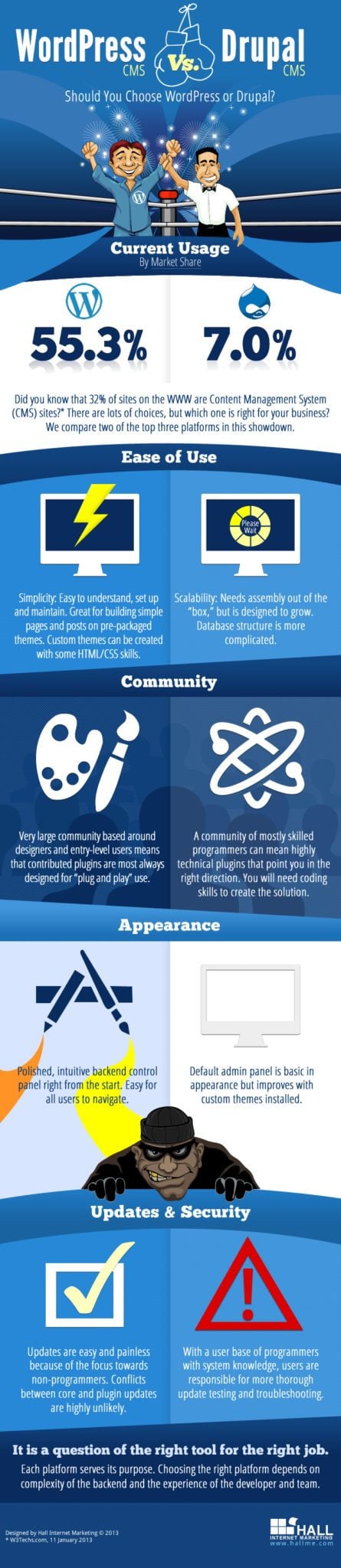
A CMS, or content management system, can be a great way to manage your website. There are several levels of CMS solutions and the right choice should meet your needs of today, be scalable enough to meet your needs tomorrow and deliver a low total cost of ownership down the road.

Hall offers four popular types of web based solutions that are suitable depending on your specific needs - Blog Software-Based, Partial CMS, Full CMS and Enterprise Level CMS solutions.

Blog Software-Based

The most popular way to create a small CMS on the web today is to use open source blogging software. WordPress is one of the most popular blogging CMSs and is relatively easy to configure. It is a great solution for small sites of less than 10 pages and where the site is likely to remain simple and small in the future.

Scalability and expanded functionality is limited in blogging software. If you hope to grow your site and your user experience over time, a blog site may become a bit like using a screw driver as a hammer - it just doesn't work well that way.

Partial CMS Solution

For novice users with a site where content changes often and SEO is a primary consideration, a partial CMS is a good choice. It ensures that a user with minimal skills can edit content without ever breaking something on the site. It also protects the on-page SEO from user editing and "optimizing" pages that have been professionally optimized.

Partial CMS Systems are limiting in that users can edit only designated areas of a website. Scalability involves adding modules to create editable areas. Scaling to a full CMS will require a rebuild. For those who have limited skills or want the high confidence that minor site updates (for example newsletters, training classes, events calendar, etc) can be completed by any staff member, a partial CMS is a suitable solution.

Full CMS System

A full CMS allows the site administrator to fully manage the entire site from adding pages and page content to uploading images and creating custom contact forms. With increased access comes an increased need for training and the increased risk of breaking the site - deleting pages, content or eliminating functionality.

Training for all CMS systems should include both how to use the system and also how to use the system in a search friendly way. If driving traffic from search is part of your strategy more than a passing understanding of SEO is important to get the most from your CMS. Remember, as you take over more responsibility with your site, you also hold greater liability.

A full CMS, if created properly, can be very scalable and, as a result, will usually deliver a lower total cost of ownership than a static site, blog-based CMS or partial CMS. If you see you site growing over time and your web strategy involves expanding your web presence and your on-site user experience, a full CMS is a great choice - as long as a commitment to training and monitoring exists. Having the keys to the car does not make you a great driver, but with the resources available to support your effort, you can drive like a pro in no time.

Enterprise CMS

Like a full CMS, an enterprise level CMS is simply a more robust version. It allows for advance functionality and programming like multiple user environments, multiple site management and, well, just about anything you can think of.

Usually reserved for larger sites, due to the increase cost of initial development and customization, an enterprise CMS is the most common solution for large organizations. Multiple departments can manage content and their edits reviewed by their marketing team or an outside search marketing vendor before being posted live.

Security and On-going Updates

Some web based open source CMS solutions, such as Wordpress, have received bad press regarding security. Any CMS is not very secure when configured in the default configuration on a shared hosting environment. It is important to work with a web team to set up security precautions that prevent hackers. Once the website is up live it needs to be monitored and updated. Ongoing support, software updating, security monitoring and content monitoring will prevent breaches and help you get the most from your CMS System.

Learn More About CMSs

Our CMSs are optimized based on industry-accepted best practices. We are continually refining and updating our systems to keep security and functionality up to date. These systems are ready for you to implement your content marketing and SEO strategies.

If you want to learn more about CMSs now, we recommend reading CMS-related entries on our blog or viewing the following archived webinar:

Follow us on TwitterConnect with us on FacebookJoin us on LinkedInAttend Social Media Breakfast Maine